 DEVICE BEAM
Zero-Touch Provisioning for Your Entire Fleet of Spectralink 8400 Series Feature Phones
Device Beam is a hardened, self-contained appliance that replaces your legacy CMS provisioning server. Phones enroll, configure, and update themselves automatically — every change captured in a git-backed audit trail, entirely behind your firewall.
- ✓ No cloud dependency
- ✓ Benchmarked to 10,000 devices
- ✓ Self-updating with auto-rollback
One Appliance, From Boot to Fleet
Device Beam ships as a single, hardened Fedora CoreOS appliance. Boot it, point your phones at it, and it takes over provisioning, configuration, and monitoring for the whole fleet.
Boot the Appliance
A guided wizard builds a ready-to-boot installer ISO. It self-configures networking, containers, and TLS certificates — zero manual OS steps.
Point Your Phones
Repoint your existing provisioning DHCP/DNS option at the new appliance. No handset visits, no re-imaging, no new hardware.
Devices Provision Automatically
Phones pull their manifest, config, certificates, and firmware over FTP/FTPS, then heartbeat status back — falling into a pending queue for approval.
Manage the Fleet
Approve, configure, and monitor from the CLI, the TUI, or the Device Beam Operator app — every change lands as a signed, queryable git commit.
Why Fleet Teams Choose Device Beam
Purpose-built for teams that run hundreds to thousands of Spectralink 8400 Series Feature Phones and need to know exactly what changed, when, and by whom.
Complete Audit Trail
Every config write is a git commit — authored by the admin, committed by the appliance, with structured trailers. History is the audit log; nothing to bolt on.
Stays On Your Network
Everything runs on-premise behind your firewall. No cloud accounts, no third-party data path — the whole fleet's configuration never leaves your building.
Fleet-Wide Scale
Approve one device or five hundred at once. Config cascades from device → group → enterprise → defaults, so fleet-wide changes are a single edit.
Safe Self-Update
Update the appliance's own OS and containers with one command. Every update health-checks itself and automatically rolls back on failure.
Role-Based Access
Admin, operator, and device_helpdesk roles — with per-parameter area fencing, so a helpdesk account only ever sees the settings it's been granted.
Backup, Restore & Migration
Scheduled backups with retention, one-command restore that preserves device TLS identity, and a guided importer from your legacy CMS export.
Device Beam vs. a Legacy CMS Server
Legacy provisioning servers were built for a smaller fleet and a slower pace of change. Device Beam was rebuilt from scratch around auditability, safe updates, and scale.
| Capability | Device Beam | Legacy CMS |
|---|---|---|
| Audit trail | Every change is a signed, queryable git commit | Opaque or manual logs |
| Deployment | Self-configuring installer ISO, boots in minutes | Manual OS + application install |
| Updates | One command, health-checked, auto-rollback | Manual patching, no rollback |
| Access control | Three roles with per-parameter area fencing | Coarse, all-or-nothing admin access |
| Data residency | 100% on-premise appliance | Varies by installation |
| Scale | Benchmarked to 10,000 devices | Typically unverified at scale |
Already running a legacy CMS? Device Beam's importer migrates devices, groups, configuration, wireless profiles, firmware, and certificate continuity from a real export — see Migration.
The Device Beam Operator App
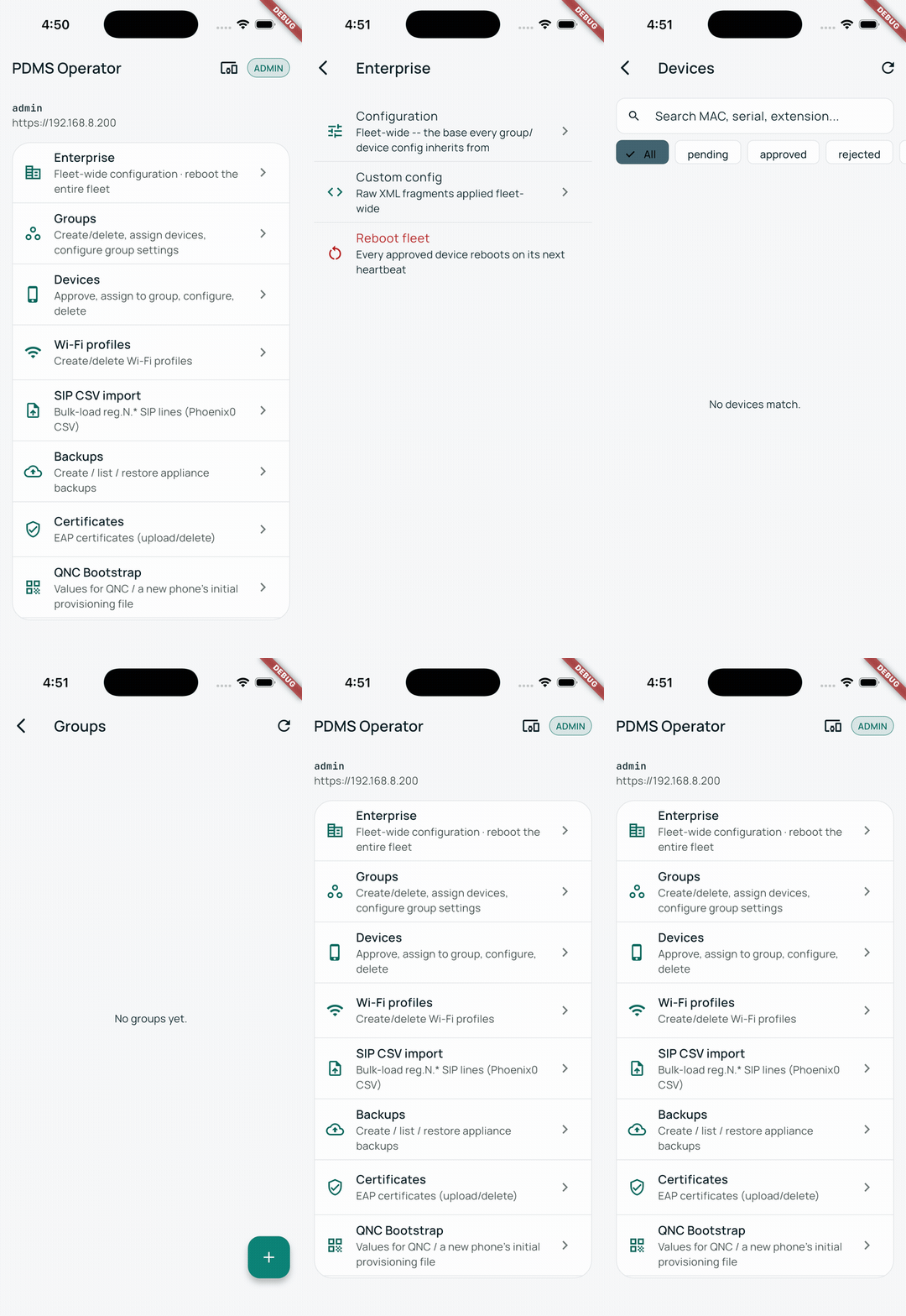
A single mobile app builds its own menus, screens, and field-level UI from what the API says the logged-in account can do. Admins see everything; operators and helpdesk staff see exactly their slice — no separate app per role to build or maintain.
Approve devices, edit configuration, rotate certificates, manage firmware, and read the audit log — from a phone or tablet, anywhere on your network.
Wherever Your Spectralink Fleet Runs
Any organization running Spectralink 8400 Series Feature Phones at scale needs the same thing: phones that just work, and a record of every change made to them.
Hospitality
Provision a growing property fleet without a truck roll to every handset — new staff phones enroll and configure themselves.
Retail
Push a wireless or SIP change to every store from one console, with a clean audit trail for every configuration change.
Manufacturing
Keep floor communications hardware running with self-healing updates and health monitoring — no unplanned downtime.
Healthcare (Non-Clinical)
Give operational teams — transport, environmental services, facilities — reliable phones with strict, auditable access control.
Live in an Afternoon, Not a Quarter
Getting Device Beam running alongside — or in place of — your existing provisioning server is a short, guided process.
Answer the setup wizard
IP address, subnet, gateway, DNS, hostname, registry, and admin password — a few prompts, no manual OS install.
Boot the installer ISO
The appliance self-configures networking, containers, TLS, and security policy with zero manual steps.
Create your first admin
Log in with the printed bootstrap secret and create the first real admin account — bootstrap disables itself immediately after.
Approve your first devices
Phones request access as they boot and check in. Approve individually or in batches of up to 500 at once.
Manage from anywhere
Hand the fleet to your team via the CLI, the TUI, or the Operator app — each scoped to the account's role.
Everything You Need to Know
Yes. Device Beam is a from-scratch replacement for legacy Java CMS provisioning servers, built for the same fleet of Spectralink 8400 Series Feature Phones. A guided importer migrates devices, groups, config, wireless profiles, firmware, and certificate continuity from a real CMS export.
No. Device Beam runs entirely on-premise as a self-contained appliance behind your firewall. No cloud accounts, no internet dependency for day-to-day operation.
Device Beam is benchmarked at 10,000 devices on a single appliance, with batch operations like approval capped at 500 per transaction to keep the fleet responsive.
Spectralink 8400 Series Feature Phones — the same fleet already running on your network today.
Yes. Every config write is committed to a git-backed store with the requesting admin as author. That commit history is the audit log — queryable by action, target, or time range, no separate logging system required.
Yes. Three roles — admin, operator, and device_helpdesk — with device_helpdesk further fenced to only the parameter areas an admin explicitly grants. The fence applies to both reads and writes, enforced server-side.
Every self-update applies, health-checks the result, and automatically rolls back if the health check fails — the appliance is designed to come back healthy on its own, without a truck roll.
Scheduled backups with configurable retention let you restore to a second appliance as a disaster-recovery target, preserving device TLS identity so provisioned phones don't need to be re-trusted after a restore.
See Device Beam Manage a Real Fleet
Talk to our team about your deployment — self-hosted, on your network, live in an afternoon.
- ✓ Live appliance walkthrough
- ✓ Legacy CMS migration assessment
- ✓ Network & provisioning integration review